
ChatGPT · Multi-network scheduling
How to schedule social media posts with ChatGPT
This is the workflow from the SimplePost team's own ChatGPT recording: look at the week, create one post for four networks in two shapes, preview it, and schedule it into an open slot, all in one conversation.
About 5 minutes · Free 7-day trial, no credit card
Quick answer
Can ChatGPT schedule social media posts?
Yes. With the SimplePost plugin, ChatGPT can create posts with a scheduled time on any of your connected accounts. SimplePost stores them and publishes them when they are due, even after the chat is closed.
Before you start
What you need
- Accounts connected in SimplePost for every network you want (this example uses X, LinkedIn, Threads and Bluesky).
- The SimplePost plugin installed in ChatGPT.
- Posting slots under Settings → Posting slots, if you want ChatGPT to use open slots.
Workflow
Step by step: how to schedule social media posts with ChatGPT
Show the week
ChatGPT opens the SimplePost calendar widget with scheduled posts and open slots.
Prompt Show me my weekly schedule on SimplePost.
Create the post for two networks
Start with the networks that share one version.
Prompt Create a preview for a post on X and LinkedIn saying how easy it is to use SimplePost.
Add a thread for the others
ChatGPT adds a per-account version for Threads and Bluesky inside the same post.
Prompt Turn this into a thread for Threads and Bluesky.
Schedule everything once
Name the time. All four accounts are scheduled together.
Prompt Schedule them all for tomorrow at 10:00 Europe/Berlin.
Confirm on the calendar
Ask for the day view to see the post in place.
Prompt Show me tomorrow on my SimplePost calendar.
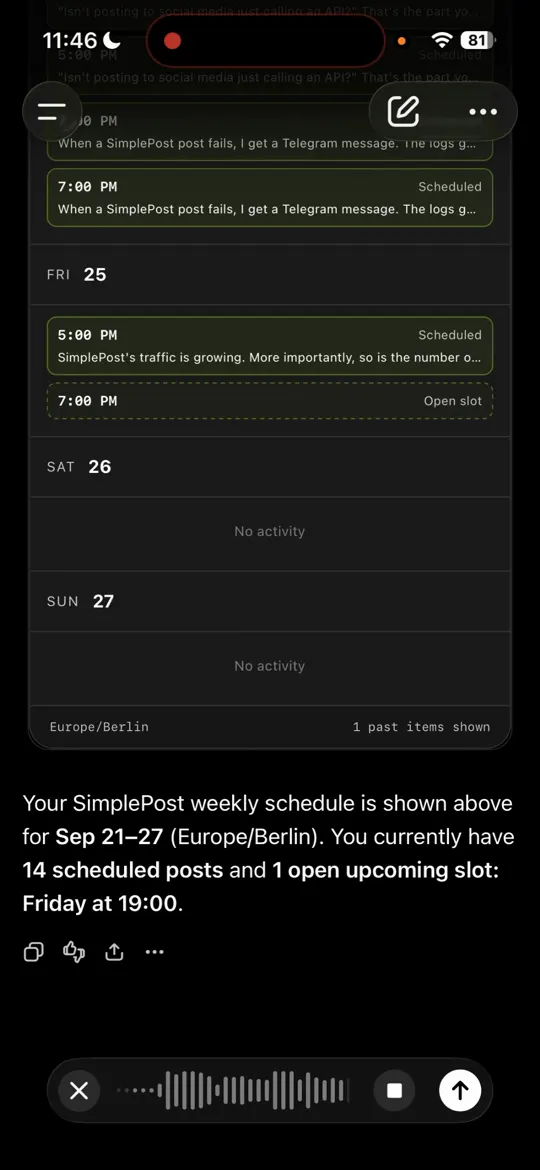
Step 1: the week in ChatGPT (SimplePost team recording, 22 September 2026). 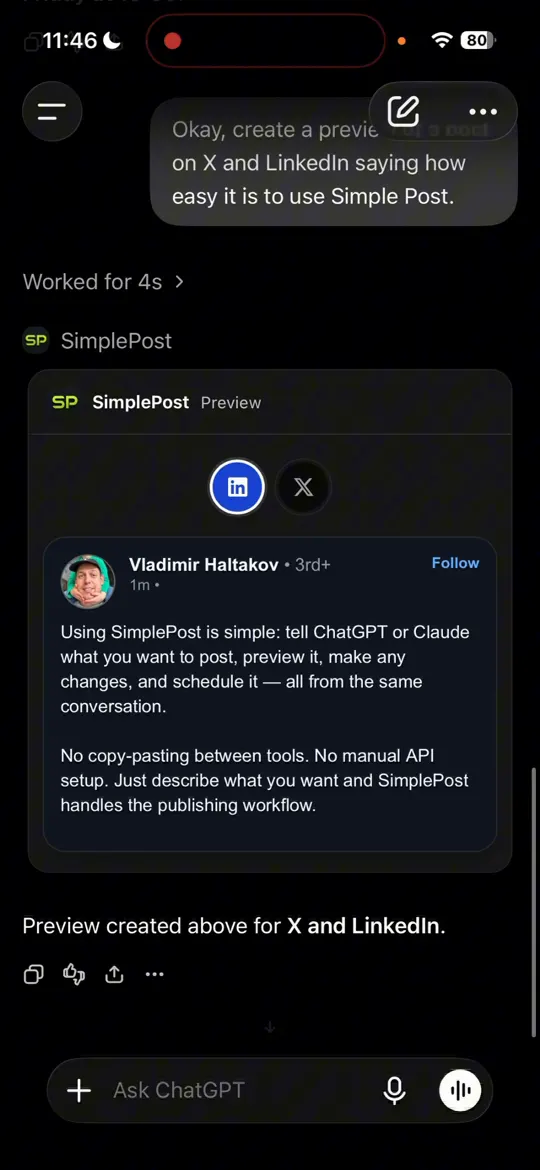
Step 2: the X and LinkedIn version. 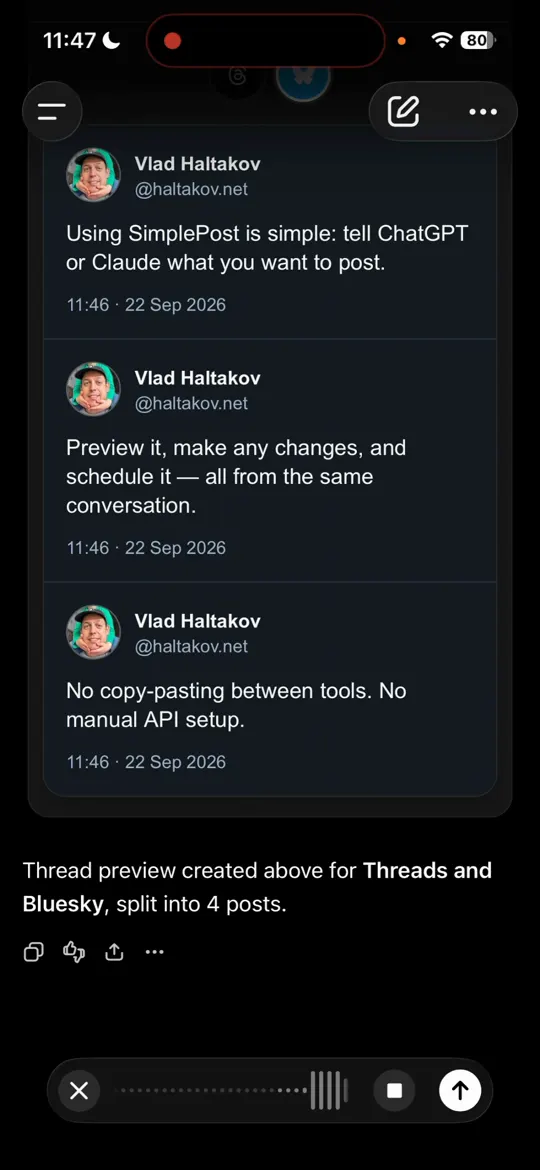
Step 3: the thread for Threads and Bluesky. 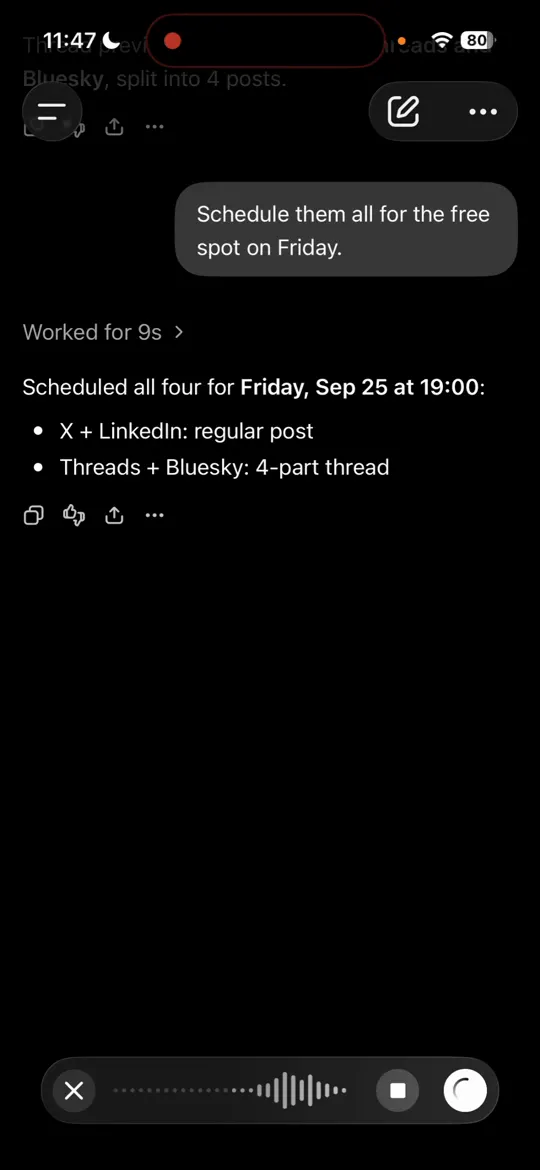
Step 4: scheduled together. In the recording, the open Friday slot was used.
Before you schedule
Check these details
- Each network's version fits its limit: X 280 weighted characters, Bluesky 300, Threads 500, LinkedIn 3,000.
- The thread is only on networks that support it (X, Bluesky, Threads, Telegram).
- The scheduled time and timezone are right.
- Networks that need media (Instagram, TikTok, YouTube, Pinterest) have it attached.
Want to check the text first without an account? Use the Cross-post generator.
Troubleshooting
If something gets in the way
The calendar shows no open slots
Add posting slots under Settings → Posting slots, or give ChatGPT an exact time.
ChatGPT created separate posts
Ask for "one SimplePost post with per-account versions". Separate posts work, but they are counted and reported separately.
The widget does not render
Every tool also returns text. Ask ChatGPT to describe the preview, or open the draft in the web app.
FAQ
Questions about this workflow
Does the schedule still run if I close ChatGPT?
Yes. The post is stored in SimplePost, which publishes it at the scheduled time.
Can ChatGPT change a scheduled post?
Yes, until it starts publishing. Ask it to edit, reschedule or discard the post.
How are posts counted?
On paid plans, one post counts once no matter how many accounts it targets. During the trial, each selected account counts against its platform's 10-post allowance.
Try this workflow with your own accounts
7 days free · No credit card · 10 posts per platform during the trial