
Model Context Protocol
Social media MCP server for posting and scheduling
SimplePost runs a hosted MCP server that gives AI assistants a safe way to publish. It exposes 12 tools for accounts, validation, previews, media, scheduling and post management across ten social networks. Connect your accounts once in SimplePost; any MCP client you authorize can then draft, preview and schedule with them.
Server URL: https://app.simplepost.social/mcp · Included on every plan and the free trial
Quick answers
The short version
- Does SimplePost have an MCP server?
- Yes:
https://app.simplepost.social/mcp, a remote Streamable HTTP server secured with OAuth. - What can it do?
- List accounts, validate, preview, upload media, publish now, schedule, save drafts, show the calendar, and inspect, edit or discard drafts and scheduled posts.
- Which networks?
- X, LinkedIn, Instagram, Facebook, Threads, Bluesky, TikTok, YouTube, Pinterest and Telegram.
- Which clients?
- ChatGPT and Claude through their directories; Claude Code, Cursor, OpenClaw, Gemini CLI and other clients that support remote MCP with OAuth. See AI clients.
Connection
Endpoint, transport and authentication
| Endpoint | https://app.simplepost.social/mcp |
|---|---|
| Transport | Streamable HTTP, stateless (POST) |
| Authorization | OAuth authorization code with PKCE (S256), dynamic client registration (RFC 7591) |
| Discovery | /.well-known/oauth-protected-resource and /.well-known/oauth-authorization-server |
| Scopes | accounts:read, posts:read, posts:validate, posts:write |
| Tokens | Expire after 90 days, stored only as hashes, revocable; no refresh tokens |
| Plans | Every paid plan and the 7-day free trial |
https://app.simplepost.social/mcpclaude mcp add --transport http simplepost https://app.simplepost.social/mcpUnauthenticated requests receive 401 with a WWW-Authenticate header pointing to the protected-resource metadata, so compliant clients start the OAuth flow on their own. See the MCP authorization specification.
Tools
The 12 MCP tools
| Tool | Scope | Purpose |
|---|---|---|
| list_accounts | accounts:read | Return connected social accounts with their accountId, platform, name and credential status. |
| get_tiktok_creator_info | accounts:read | Read a TikTok account's allowed privacy levels, interaction settings and limits. |
| upload_media | posts:write | Import a file from a compatible chat client, or a public URL, and return a SimplePost media URL. |
| validate_post | posts:validate | Check text and media against each network's rules without creating anything. |
| preview_post | posts:validate | Resolve accounts, media, schedule time and validation as data, without writing. |
| show_post_preview | posts:read / posts:validate | Render a visual preview of unsaved content or a saved post (MCP Apps UI with a text fallback). |
| get_schedule | posts:read | Return day, week or month calendar data, including open posting slots, in an IANA timezone. |
| show_schedule | posts:read | Render the interactive calendar. |
| create_post | posts:write | Publish now, schedule for later or save a draft, with per-account overrides, threads, quotes and an idempotency key. |
| inspect_posts | posts:read | List drafts, scheduled, posted or failed posts, or inspect one post and its per-account results. |
| update_scheduled_post | posts:write | Edit a draft or future scheduled post: text, accounts, media, thread, options or time. |
| discard_scheduled_post | posts:write | Delete a draft or future scheduled post and its stored media. |
Write tools are marked destructive, so a client may ask you before running them. Full parameters are in the tool reference.
Recommended workflow
How an assistant should publish through MCP
Find real accounts
Call list_accounts. If nothing is connected, send the user to the SimplePost web app.Prepare content and media
Draft the text, choose account IDs, and use a public media URL or upload_media when the client can pass a file.Preview when useful
preview_post returns validation data; show_post_preview renders the visual preview. Neither writes anything.Write once
create_post with now, schedule or draft, and a new idempotency key. Reuse that key only to retry the same write.Report the result
Read every per-account and per-segment result; a successful call can contain partial failures.Manage later
inspect_posts to find posts; update_scheduled_post or discard_scheduled_post for drafts and future posts.
{
  "message": "Northwind 2.4 is out: offline mode. Edit anywhere, sync later.",
  "accountIds": ["acc_linkedin", "acc_x", "acc_bluesky", "acc_threads"],
  "postingMode": "schedule",
  "scheduledFor": "2026-10-01T10:00:00+02:00",
  "media": [{ "type": "image", "url": "https://northwind.example/release-card.png" }],
  "accountOverrides": {
    "acc_bluesky": {
      "message": "Northwind 2.4 is here, and it works offline.",
      "thread": [
        { "message": "Edits are saved on your device and sync when you reconnect." },
        { "message": "Conflicts are shown to you before anything is merged." }
      ]
    },
    "acc_threads": {
      "message": "Northwind 2.4 is here, and it works offline.",
      "thread": [{ "message": "Edit anywhere. Sync when you are back online." }]
    }
  },
  "idempotencyKey": "northwind-2-4-launch"
}
Example input with placeholder account IDs. LinkedIn and X use the shared message; Bluesky and Threads get their own threads through accountOverrides.
Capabilities
Scheduling, previews, variants and media
Scheduling
- Schedule with an ISO 8601 time that includes an offset; calendar tools take an IANA timezone such as Europe/Berlin.
- SimplePost stores and publishes the post at the due time, then validates it again before sending.
- get_schedule returns scheduled, pending, published and failed activity plus open posting slots.
Previews
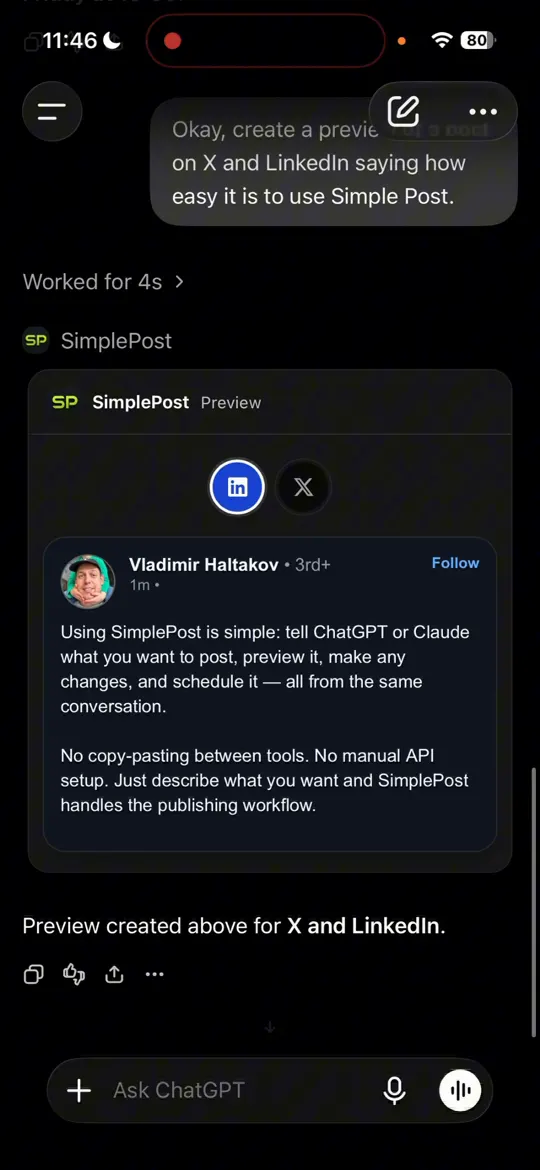
- show_post_preview and show_schedule render MCP Apps widgets where the client supports them, such as ChatGPT and Claude.
- Every tool also returns text and structured data for clients without widgets.
Per-network variants and threads
- accountOverrides replaces the message, media or thread for specific accounts inside one post.
- Threads of up to 24 follow-ups are native on X, Bluesky, Threads and Telegram; other networks get the first post and a warning.
- Quote posts via quotePostId on X, Bluesky, Threads and LinkedIn.
Media
- Public image and video URLs, or files passed by the client to upload_media.
- JPEG, PNG, GIF, WebP, MP4, QuickTime and WebM; up to 500 MB per file through MCP.
- Base64 data, local file paths and blob: URLs are not accepted by the remote server.
Platforms
Networks the MCP server publishes to
- Schedule LinkedIn posts with AIPersonal-profile posts with up to 9 images or a video, visibility settings and a feed preview.
- Schedule X (Twitter) posts with AIPosts, threads of up to 25 posts, quotes and media on X, with weighted-length checks before publishing.
- Schedule Instagram posts with AIPhotos, Reels and carousels of up to 10 items for professional accounts, with media checks before publishing.
- Schedule Threads posts with AIText posts, reply chains, quotes and carousels of up to 20 images and videos on Threads.
- Schedule Bluesky posts with AIPosts, threads and quotes with up to 4 images or a video on Bluesky, with alt text support.
- Schedule Facebook Page posts with AIPage posts with long text, up to 10 images or one video, for every Facebook Page you manage.
- Schedule TikTok videos with AIVideos and photo posts of up to 35 images, with privacy, interaction and disclosure settings.
- Schedule YouTube uploads with AIVideo uploads with title, description, tags, category, privacy, audience and custom thumbnail.
- Schedule Pinterest Pins with AIImage and video Pins on a chosen board, with title, description, link and alt text.
- Schedule Telegram posts with AIChannel and group messages, albums of up to 10 items and reply chains through your own bot.
Compatible clients
AI clients that use the SimplePost MCP server
- Directory listingPublish to social media from ChatGPTInstall the SimplePost plugin in ChatGPT to preview, schedule and publish posts on ten networks.
- Directory listingPublish to social media from ClaudeConnect SimplePost from the Claude directory to prepare, adapt, preview and schedule posts.
- Manual MCP configurationPublish to social media from Claude CodeAdd the SimplePost MCP server with one command and publish release announcements from your repository.
- Manual MCP configurationPublish to social media from CursorAdd SimplePost to Cursor's mcp.json so the agent can announce releases on your social accounts.
- Installable extension or bundlePublish to social media from OpenClawInstall the SimplePost bundle from ClawHub or add the MCP server, then publish from your agent.
- Installable extension or bundlePublish to social media from Gemini CLIInstall the SimplePost Gemini CLI extension and schedule posts from the terminal.
Other clients that support remote Streamable HTTP servers with OAuth can use the same URL. See all AI clients and the social media scheduler for AI agents for CLI and API options.
Hosted and open source
Hosted SimplePost versus the open-source components
| Hosted MCP server | app.simplepost.social/mcp. Uses accounts connected in hosted SimplePost; SimplePost supplies the platform apps. Every plan and the trial. |
|---|---|
| Self-hosted Scheduler and MCP | The same Scheduler app, including its MCP and OAuth server, from the MIT-licensed simple-post/core repository. You provide the platform developer apps and credentials. |
| TypeScript SDK | @simple-post/sdk 1.4.0 on npm. Publishes directly with your own credentials; no hosted scheduling or MCP. |
| CLI | @simple-post/cli 1.4.0. Hosted accounts on Advanced and Pro, or local accounts with your own credentials. Publishes immediately. |
| Hosted HTTP API | Bearer API keys on Pro and the trial, with drafts, scheduling, idempotency and webhooks. |
Source: github.com/simple-post/core · published packages and hosted features
FAQ
MCP server questions
Does SimplePost have an MCP server?
Yes. SimplePost hosts a remote MCP server at https://app.simplepost.social/mcp. It uses Streamable HTTP and OAuth, and it is included on every SimplePost plan and the 7-day free trial.
Which social networks can the MCP server post to?
X, LinkedIn, Instagram, Facebook, Threads, Bluesky, TikTok, YouTube, Pinterest and Telegram: the same ten networks as the SimplePost web app, using the accounts you connected there.
Can the MCP server schedule posts?
Yes. create_post accepts a posting mode of now, schedule or draft. Scheduled posts are stored by SimplePost and published when they are due, even if the assistant is no longer running.
Does it need an API key?
No. Clients authorize with OAuth and PKCE, and register themselves with dynamic client registration. SimplePost API keys are for the Pro HTTP API and are not accepted by the MCP server.
Is the MCP server open source?
Yes. The MCP server is part of the SimplePost Scheduler app in the MIT-licensed simple-post/core repository. You can self-host the Scheduler with your own platform apps and use your deployment's /mcp endpoint.
Can an assistant connect social accounts through MCP?
No. Social accounts are connected and reconnected in the SimplePost web app. The MCP server only works with accounts that are already connected, and it never exposes their tokens.
Connect an assistant in minutes
7 days free · No credit card · MCP on every plan