
Directory listing · Anthropic
Claude social media publishing with SimplePost
Claude is good at the thinking part of social media: turning notes into a clear post and adapting it for each network. The SimplePost connector adds the publishing part. Claude can see your connected accounts and calendar, show previews and schedule posts, with SimplePost handling validation and delivery.
SimplePost's MCP access is included on every plan and the 7-day free trial. You keep your own AI subscription.
Connection method
How Claude connects to SimplePost
What you need
- A SimplePost account on the free trial or a paid plan.
- At least one social account connected in the SimplePost web app.
- A Claude plan that allows directory connectors. Which plans include connectors, and whether an organization allows them, is decided by Anthropic and your admin.
What it enables
What Claude can do with SimplePost
- Read your connected SimplePost accounts and your calendar for any week and timezone.
- Turn one idea into per-network versions inside a single post.
- Show visual previews for unsaved content or saved posts.
- Schedule, publish, or save drafts, and report the result per account.
- Find, edit, reschedule or discard drafts and future scheduled posts.
It works through SimplePost's social media MCP server. Claude cannot connect social accounts, read engagement analytics or change posts that are already published; those stay in the SimplePost web app or on the network.
Setup
Set up SimplePost in Claude
Connect your social accounts
Start the SimplePost trial and connect your networks under Accounts.
Open SimplePost in the Claude directory
Go to the SimplePost listing and choose Connect.
Authorize
Sign in to SimplePost with the same account and approve access.
Enable the connector in a chat
Turn on SimplePost for the conversation and ask Claude to list your accounts.
Authentication
Sign-in, permissions and tokens
- Claude connects with OAuth. You approve access on a SimplePost page, and Claude receives a scoped token, never your password or social network tokens.
- Tokens expire after 90 days and can be revoked at any time. Disconnecting the connector in Claude's settings removes Claude's access.
- For a self-hosted SimplePost, add your own server's /mcp URL as a custom connector where your Claude plan supports it.
Workflow
Example: prepare, adapt and schedule with Claude
These prompts follow the SimplePost team's own recording in the Claude mobile app from 22 September 2026: check the week, draft for X and LinkedIn, adapt for Threads and Bluesky, schedule, then confirm on the calendar.
Show me my weekly schedule on SimplePost.
Result: Claude opens the SimplePost calendar and summarizes it: scheduled posts, published posts and the open slot.
Create a preview for a new post on X and LinkedIn explaining how easy it is to use SimplePost.
Result: Claude drafts the copy and shows a preview for both networks. Nothing is saved.
Now turn this into a thread for Threads and Bluesky.
Result: Claude builds platform previews of a four-part thread for Threads and Bluesky.
Schedule it for Friday 7 p.m., then show me my Friday schedule.
Result: Claude resolves the date in your timezone, creates the scheduled post and opens Friday in the calendar.
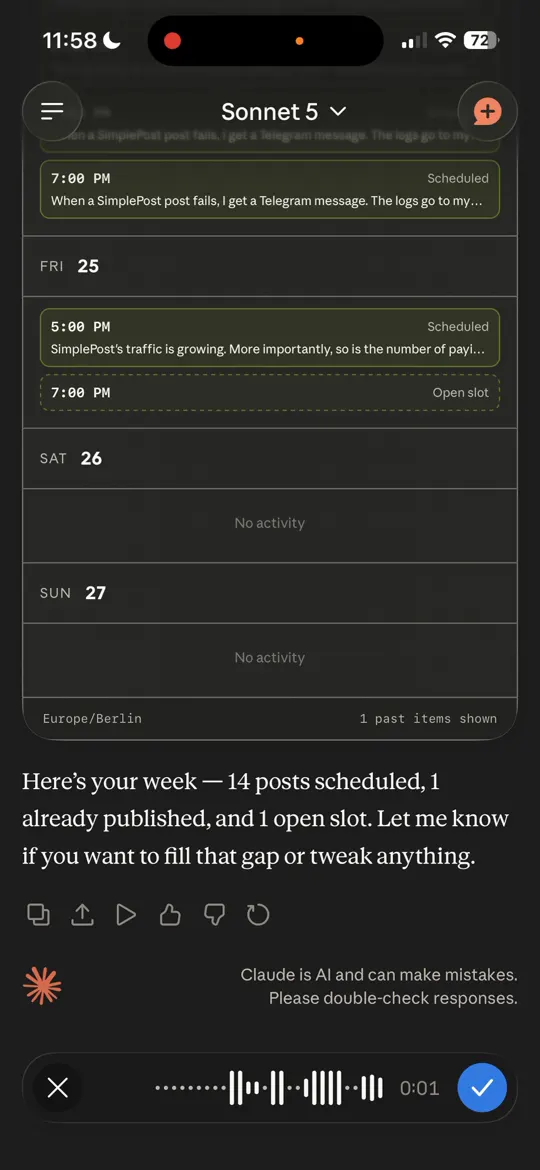
The SimplePost calendar inside Claude, from the team's 22 September 2026 recording. 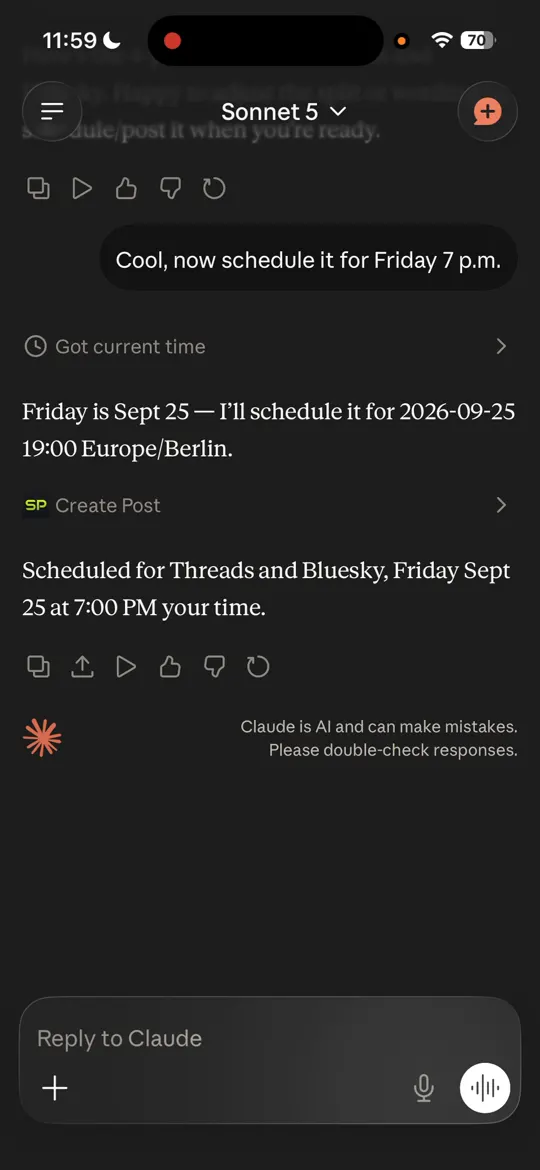
Claude resolves "Friday 7 p.m." to an exact time and schedules the post. 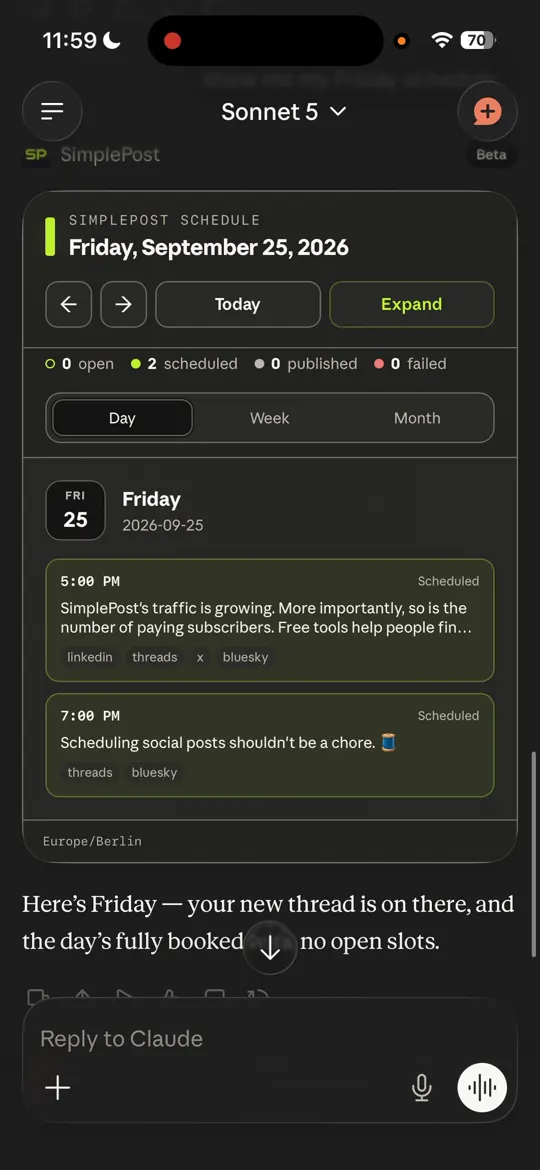
The Friday view afterwards, with the new thread scheduled for Threads and Bluesky.
Per-network versions
General and platform-specific versions
- Claude keeps the network versions together in one SimplePost post: a shared message plus per-account overrides with different text, media or thread shape.
- Give Claude your constraints once ("LinkedIn: detailed, no emoji; X: one sentence; Bluesky: under 300 characters") and ask it to apply them to every post in the conversation.
- Claude can check the calendar before choosing a time. The calendar shows existing activity and your preferred posting slots; it does not predict engagement.
Post lifecycle
Preview, schedule, publish and manage posts
| Preview | show_post_preview renders previews in Claude where MCP Apps are supported, with a text fallback. |
|---|---|
| Schedule | create_post with a scheduled time; Claude converts "Friday 7 p.m." to an exact timestamp with your timezone. |
| Publish now | create_post publishes immediately and returns per-account results. |
| View scheduled posts | show_schedule and get_schedule for the calendar; inspect_posts for lists and single posts. |
| Update or cancel | update_scheduled_post and discard_scheduled_post for drafts and posts that have not started publishing. |
Supported platforms
Networks Claude can publish to
All ten hosted networks work the same way from Claude: X, LinkedIn, Instagram, Facebook, Threads, Bluesky, TikTok, YouTube, Pinterest and Telegram. These platform guides are most relevant here:
- Schedule LinkedIn posts with AIPersonal-profile posts with up to 9 images or a video, visibility settings and a feed preview.
- Schedule X (Twitter) posts with AIPosts, threads of up to 25 posts, quotes and media on X, with weighted-length checks before publishing.
- Schedule Threads posts with AIText posts, reply chains, quotes and carousels of up to 20 images and videos on Threads.
- Schedule Bluesky posts with AIPosts, threads and quotes with up to 4 images or a video on Bluesky, with alt text support.
- Schedule Telegram posts with AIChannel and group messages, albums of up to 10 items and reply chains through your own bot.
Troubleshooting
If Claude cannot publish
Claude finds no accounts
Connect a social account in the SimplePost web app, then ask again in the same conversation. Authorizing the connector does not connect social accounts.
A file cannot be read
The hosted server cannot read local paths. Use a public media URL, or upload the media in the web composer and let Claude handle the text.
A scheduled post failed
Ask Claude to inspect the post. The per-account result names the problem; reconnect expired accounts in the web app, then edit and retry.
The connector is not offered
Connector availability depends on your Claude plan and organization settings. The web composer works with the same accounts in the meantime.
FAQ
Claude and SimplePost questions
Can Claude schedule social media posts?
Yes. With the SimplePost connector, Claude creates posts with a scheduled time in SimplePost, which publishes them to your connected accounts when they are due. Claude can also show your calendar and change posts before they are sent.
Can Claude post to several networks with different text?
Yes. Claude creates one post with per-account overrides, so each network gets its own version, and schedules them together.
Is SimplePost an official Anthropic connector?
No. SimplePost is an independent product listed in Claude's connector directory. It is not built or endorsed by Anthropic.
Does Claude need access to my social media passwords?
No. Social accounts are connected in SimplePost with each network's own authorization. Claude only receives a SimplePost token with scoped access.
Can I use SimplePost in Claude Code too?
Yes. Claude Code connects to the same MCP server with a single command. See the Claude Code page for release-publishing workflows.
Guides and documentation
Guides
Documentation
Publish from Claude this week
7 days free · No credit card · 10 posts per platform during the trial