
One idea. Ten networks.
Post to all social media at once
Write one idea, adapt it where each network needs something different, and schedule every version with a single action. SimplePost sends it to all your connected accounts at the same time and tells you exactly what happened on each one.
Free 7-day trial · 10 posts per platform · No credit card
Maintained by SimplePost · Updated
Workflow
Four steps to post everywhere
Connect every account once
Open Accounts in SimplePost and connect each network you use. Several accounts per network are fine.Write the core message
Draft it in the web composer or with an AI assistant such as ChatGPT or Claude.Customize per network
Give accounts their own text, media or thread where the shared version does not fit.Preview and schedule once
Check every version, choose one time, and schedule. Results come back per account.
Three ways to do it
- With an AI assistant. Ask ChatGPT, Claude or another MCP client for one post with per-network versions.
- In the web composer. Select all accounts, then customize the ones that need a different version.
- Through the API (Pro). Send
accountIdsandaccountOverridestoPOST /api/v1/posts. See the API quickstart.
Preparing the text first? The free social media post preview shows every network side by side and can hand the versions to SimplePost.
Real example
One post, four networks, two shapes
One post for X and LinkedIn. A thread for Threads and Bluesky. One request to schedule them all. These screenshots show SimplePost inside ChatGPT; the same workflow works in Claude.
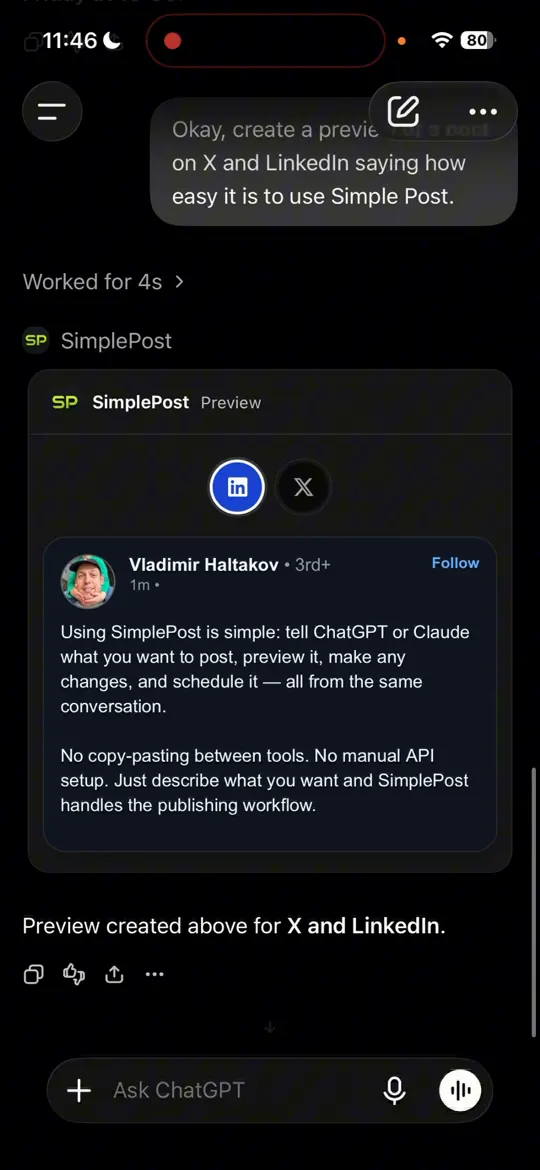
1. The X and LinkedIn version. 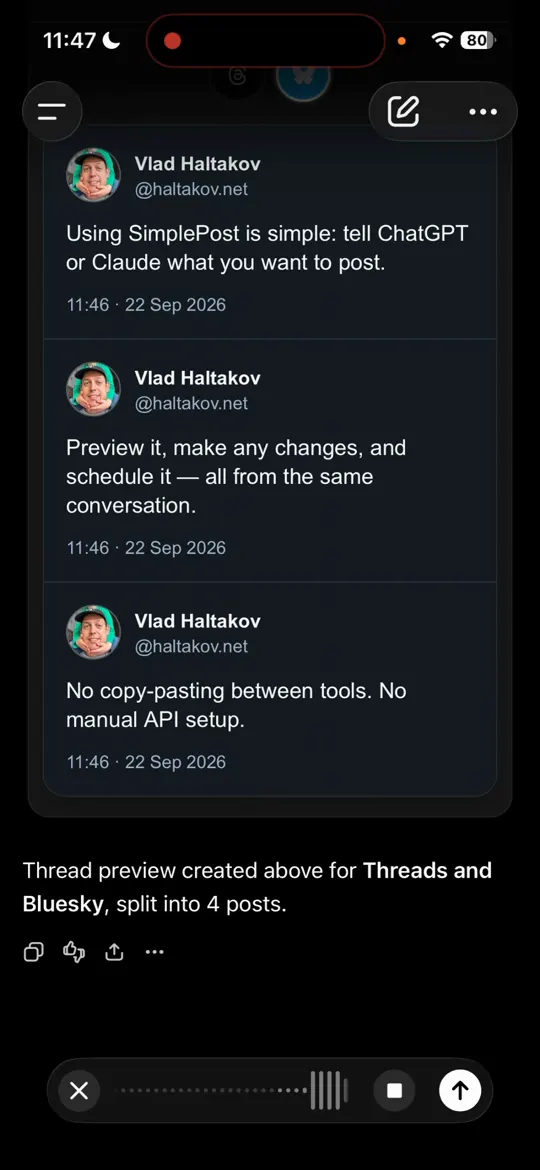
2. The thread for Threads and Bluesky. 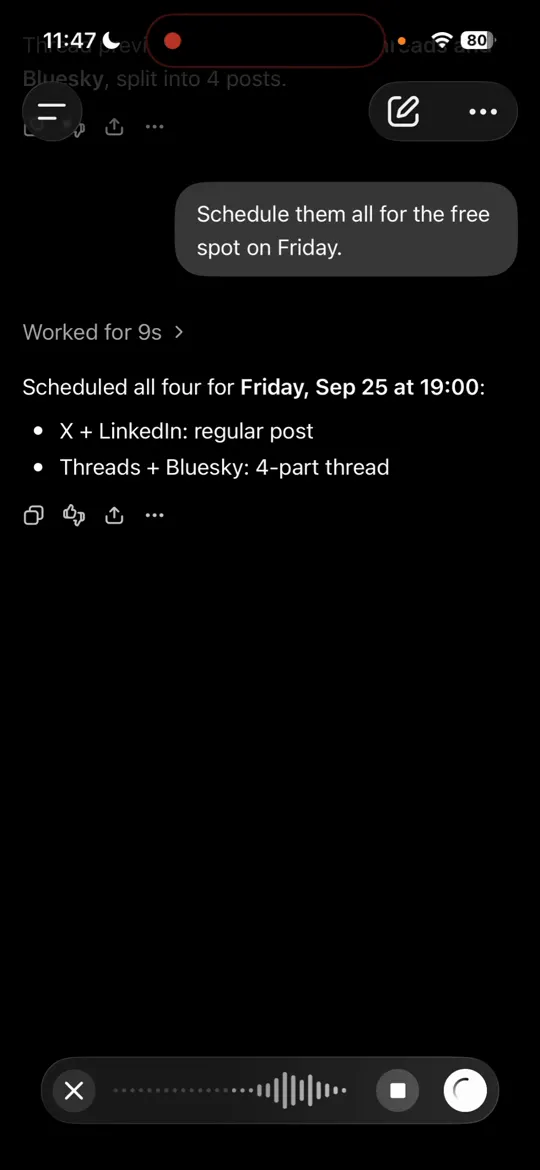
3. All four scheduled with one request.
How it works
How one post becomes several versions
Every SimplePost post has a shared message, media and optional thread. For any selected account you can add an override that replaces one or more of those. Accounts without an override use the shared version.
In the web composer, open the account's customize view. With an assistant, describe the versions in plain language; it sends them as accountOverrides. Through the API, send the same structure yourself.
For developers: API example
{
  "message": "Northwind 2.4 adds offline mode. Edit anywhere, sync later.",
  "accountIds": [
    "acc_linkedin",
    "acc_x",
    "acc_bluesky",
    "acc_threads"
  ],
  "postingMode": "schedule",
  "scheduledFor": "2026-10-01T10:00:00+02:00",
  "accountOverrides": {
    "acc_linkedin": {
      "message": "The most common support message we got last year ... (full story)"
    },
    "acc_bluesky": {
      "message": "Northwind 2.4 works offline.",
      "thread": [
        {
          "message": "..."
        },
        {
          "message": "..."
        }
      ]
    },
    "acc_threads": {
      "message": "Northwind 2.4 works offline.",
      "thread": [
        {
          "message": "..."
        }
      ]
    }
  }
}
Per network
What each network needs
| Network | Text limit | Media required | Reply chains |
|---|---|---|---|
| X (Twitter) | 280 weighted characters for standard accounts; longer posts need an eligible account | No | Native reply chain |
| 3,000 characters | No | First post only | |
| 2,200-character caption | Yes | First post only | |
| 63,206 characters | No | First post only | |
| Threads | 500 characters per post | No | Native reply chain |
| Bluesky | 300 characters (graphemes) per post | No | Native reply chain |
| TikTok | 2,200-character video caption; 4,000-character photo description | Yes | First post only |
| YouTube | 100-character title; 5,000-byte description | Yes | First post only |
| 100-character title; 800-character description | Yes | First post only | |
| Telegram | 4,096 characters; 1,024-character media captions | No | Native reply chain |
When something fails
Partial failures are visible and fixable
- Each account gets its own result: published with a link, or failed with the network's reason.
- A failure on one network does not stop the others.
- Edit and Retry publishes only to the accounts that did not succeed, so nothing is posted twice.
- Expired connections are fixed with Reconnect in Accounts; the error tells you which account.
FAQ
Posting to multiple networks
Can I post to multiple social media platforms at once?
Yes. One SimplePost post can target accounts on several networks at the same time. You schedule or publish it once, and SimplePost delivers it to every selected account and reports the result for each.
Does SimplePost publish the exact same post everywhere?
Only if you want it to. A post has a shared message, and per-account overrides can replace the text, media or thread for specific accounts. That is how X and LinkedIn can get one version while Bluesky and Threads get a thread.
Which social networks does SimplePost support?
X, LinkedIn, Instagram, Facebook, Threads, Bluesky, TikTok, YouTube, Pinterest and Telegram. Instagram, TikTok, YouTube and Pinterest always need an image or video.
What happens if one network fails?
The other accounts still publish. SimplePost shows the error for the failed account; after fixing it, Edit and Retry publishes only to the accounts that did not succeed.
Does posting to ten networks count as ten posts?
On paid plans, one post record counts once, no matter how many accounts it targets. During the free trial, the allowance is 10 posts per platform, and each selected account counts against its platform.
Can I post to all social media at once for free?
The 7-day free trial includes all ten networks with 10 posts per platform and no credit card. SimplePost has no free-forever plan after the trial.
Publish everywhere from one place
7 days free · No credit card · All ten platforms